Digital Signature
My latest software (.exe, .dll, .sys) will be signed.
My Digital Signature
12th: 2025-2028 (SHA-2)
- Name of signer : CrystalMark Inc.
- E-mail address : –
- Issued by : GlobalSign GCC R45 EV CodeSigning CA 2020
- Valid from 05/21/2025 to 05/21/2028 (MM/DD/YYYY)
11th: 2025-2026 (SHA-2)
- Name of signer : Open Source Developer, Noriyuki MIYAZAKI
- E-mail address : –
- Issued by : Certum Code Signing 2021 CA
- Valid from 01/27/2025 to 01/27/2026 (MM/DD/YYYY)
10th: 2024-2025 (SHA-2)
- Name of signer : Open Source Developer, Noriyuki Miyazaki
- E-mail address : –
- Issued by : Certum Code Signing 2021 CA
- Valid from 02/06/2024 to 02/02/2025 (MM/DD/YYYY)
9th: 2023-2024 (SHA-2)
- Name of signer : Open Source Developer, Noriyuki Miyazaki
- E-mail address : [email protected]
- Issued by : Certum Code Signing 2021 CA
- Valid from 02/13/2023 to 02/13/2024 (MM/DD/YYYY)
8th: 2022-2023 (SHA-2)
- Name of signer : Open Source Developer, Noriyuki Miyazaki
- E-mail address : [email protected]
- Issued by : Certum Code Signing 2021 CA
- Valid from 02/23/2022 to 02/23/2023 (MM/DD/YYYY)
For XP/Vista Users:
Please download Root CA from Root Certificates – “Certum Trusted Network Certification Authority” for UAC.
7th: 2021-2022 (SHA-2)
- Name of signer : Open Source Developer, Noriyuki Miyazaki
- E-mail address : [email protected]
- Issued by : Certum Code Signing CA SHA2
- Valid from 03/19/2021 to 03/19/2022 (MM/DD/YYYY)
For XP/Vista Users:
Please download Root CA from Root Certificates – “Certum Trusted Network Certification Authority” for UAC.
6th: 2020-2021 (SHA-2)
- Name of signer : Open Source Developer, Noriyuki Miyazaki
- E-mail address : [email protected]
- Issued by : Certum Code Signing CA SHA2
- Valid from 06/06/2020 to 06/06/2021 (MM/DD/YYYY)
For XP/Vista Users:
Please download Root CA from Root Certificates – “Certum Trusted Network Certification Authority” for UAC.
5th: 2018-2021 (SHA-2)
- Name of signer : Noriyuki Miyazaki
- E-mail address : –
- Issued by GlobalSign ObjectSign CA – SHA256 – G3
- Valid from 12/07/2018 to 03/03/2021 (MM/DD/YYYY)
5th: 2018-2021 (SHA-1)
- Name of signer : Noriyuki Miyazaki
- E-mail address : –
- Issued by GlobalSign ObjectSign CA – G3
- Valid from 12/08/2018 to 03/03/2021 (MM/DD/YYYY)
4th: 2016-2019 (SHA-2)
- Name of signer : Noriyuki Miyazaki
- E-mail address : –
- Issued by GlobalSign ObjectSign CA – SHA256 – G2
- Valid from 02/01/2016 to 02/01/2019 (MM/DD/YYYY)
4th: 2016-2019 (SHA-1)
- Name of signer : Noriyuki Miyazaki
- E-mail address : –
- Issued by GlobalSign ObjectSign CA – G2
- Valid from 02/04/2016 to 02/01/2019 (MM/DD/YYYY)
3rd: 2013-2016
- Name of signer : Noriyuki MIYAZAKI
- E-mail address : –
- Issued by GlobalSign ObjectSign CA – G2
- Valid from 02/05/2013 to 02/06/2016 (MM/DD/YYYY)
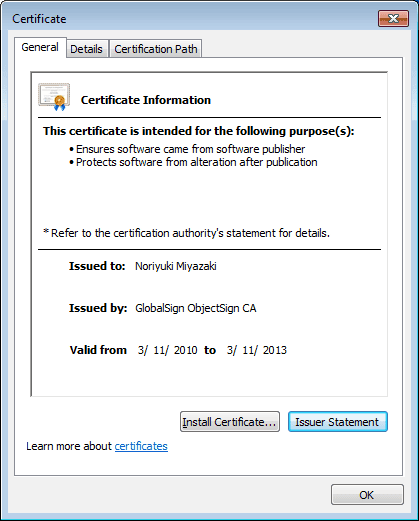
2nd: 2010-2013
- Name of signer : Noriyuki Miyazaki
- E-mail address : [email protected]
- Issued by GlobalSign ObjectSign CA
- Valid from 03/11/2010 to 03/11/2013 (MM/DD/YYYY)
1st: 2007-2008
- Name of signer : Noriyuki MIYAZAKI
- E-mail address : [email protected]
- Issued by GlobalSign ObjectSign CA
- Valid from 24/07/2007 to 24/07/2008 (MM/DD/YYYY)
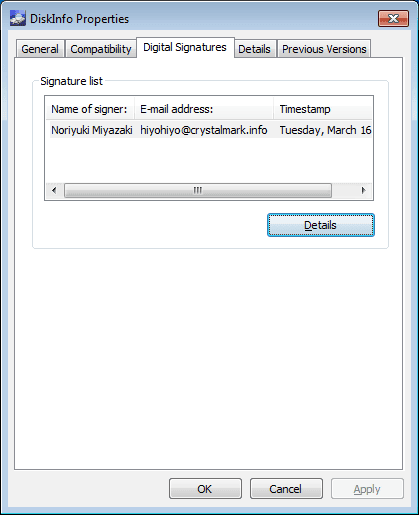
How to check Digital Signatures
*Timestamp and Signing time are depended on files.
Properties > Digital Signatures
> Details
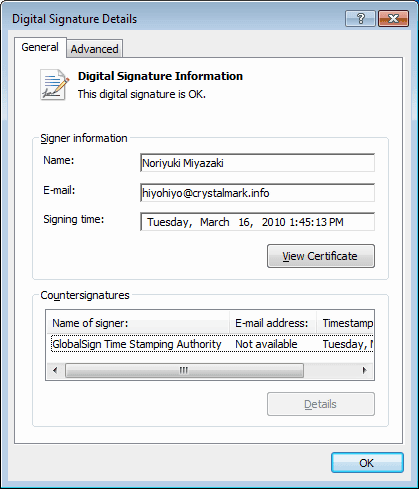
> View Certificate